Architecture Overview
Digital Distribution of SAP Business Documents
PLOSSYS Distribution Engine is the distribution-side component of the SEAL Systems solution for digital distribution of SAP business documents. It converts and distributes documents, such as forms and archived documents belonging to one business transaction, across configurable channels, and reports the distribution status back to SAP.
The following diagram shows the data flow. The dashed line marks an optional connection to a system not included in PLOSSYS Distribution Engine:
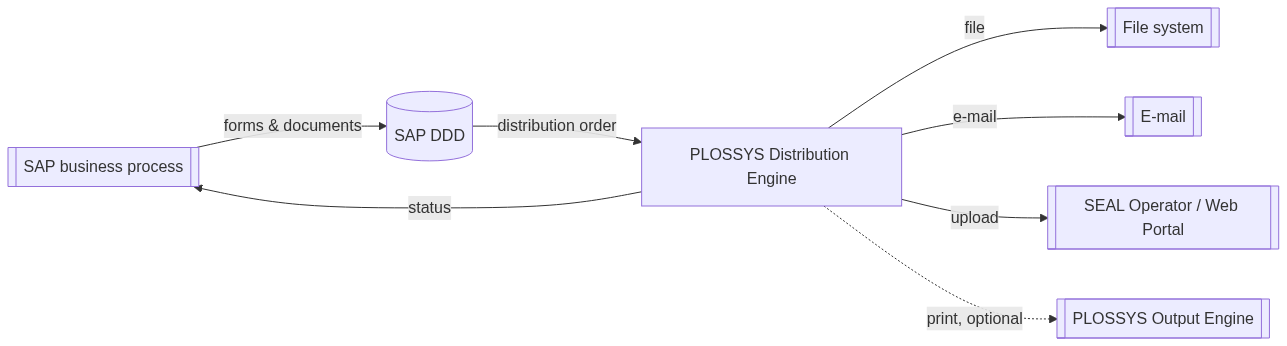
The typical data flow is:
-
SAP business processes create forms and documents for one business transaction, for example a purchase order with its forms and attachments.
-
SAP Document Distribution Director (DDD) collects all documents and metadata belonging to this business transaction into one distribution order.
-
PLOSSYS Distribution Engine receives the distribution order, converts and stamps the documents if required, and distributes them to one or more configured channels in parallel.
-
PLOSSYS Distribution Engine reports the distribution status back to SAP and, for the e-mail channel, can re-archive the sent e-mail into SAP.
Components
PLOSSYS Distribution Engine includes the following components:
-
PLOSSYS Distribution Engine Server
Digital Process Factory (DPF) process that receives distribution orders from SAP DDD via REST and distributes them to the configured channels: file system, e-mail, or SEAL Operator/Web Portal. The DPF 3.x version included in PLOSSYS Distribution Engine uses PostgreSQL as its database.
-
easyPRIMA
Central database for distributing printer configurations to PLOSSYS Distribution Engine, PLOSSYS 4 and SAP.
-
Elastic Stack
Central logging and statistics for PLOSSYS Distribution Engine, based on Elasticsearch and Kibana.
Channel Architecture
PLOSSYS Distribution Engine distributes each job across one or more channels, configured with DistChannel_n in the DIST_CONFIG configuration file. Channels run one after another, in the order of n.
PLOSSYS Distribution Engine calls a user exit before each channel runs. A project-specific workflow can hook in here, for example to prepare or filter the RLI for that channel.
Each channel distributes only the RLI lines marked with IS_DIST_FILE = Y. The RLI column CurrFileName tracks the file path through Preprocess, Process, and Distribute.
Preprocess and Process set IS_DIST_FILE based on DIST_TYPE. Refer to Configure Document Processing for the resulting IS_DIST_FILE value per DIST_TYPE.
A channel can produce its own result file, for example the EML file of a sent e-mail. PLOSSYS Distribution Engine marks that line with DIST_RESULT and DIST_RESULT_TYPE. The dpf4distribute.DistributeResultFile channel then distributes that result file to the next channel, for example to archive the sent e-mail in SAP.
Hint - building a project-specific channel
Refer to Build a Custom Distribution Channel for the conventions the standard channels follow.
Connectable Systems
PLOSSYS Distribution Engine does not ship with the following systems. They must be installed, licensed, or connected separately.
Hint - shared MongoDB
PLOSSYS Output Engine, DPF 4.x and SEAL Operator use MongoDB as their database. If more than one of these systems is installed, they can share one MongoDB instance. Configure it via the MONGO_SERVER_URL parameter in the reference documentation of the respective products.
-
SAP Document Distribution Director (DDD)
SAP-side component and prerequisite for PLOSSYS Distribution Engine. Collects all documents and metadata belonging to one business transaction and hands the resulting distribution order over to PLOSSYS Distribution Engine. For more information, refer to the SAP Document Distribution Director documentation.
-
PLOSSYS Output Engine (OUT-NGN)
Executes the physical output, such as printing and finishing, of distributed documents.
Hint - separate installation since 2.1.0
As of PLOSSYS Distribution Engine 2.1.0, PLOSSYS Output Engine no longer ships with Distribution Engine. It is installed separately and connected to PLOSSYS Distribution Engine for print output.
-
SEAL Operator/Web Portal
SEAL Operator is a Web user interface providing several panels for connecting to other systems, for example PLOSSYS Output Engine, PLOSSYS 4, DPF, Cryptshare or SharePoint. Web Portal is one panel of SEAL Operator, used for sharing distributed files with receivers. For more information refer to the SEAL Operator documentation.
Hint - license not included
The connector to SEAL Operator/Web Portal is part of PLOSSYS Distribution Engine. The SEAL Operator/Web Portal license itself is not included and must be provided separately.
-
Identity provider
Service connected via OpenID Connect (OIDC), responsible for user authentication and the mapping of roles. In practice, an OIDC identity provider already installed at the customer's site is used.
Hint - separate installation since 2.1.0
As of PLOSSYS Distribution Engine 2.1.0, a Keycloak instance for test purposes no longer ships with Distribution Engine. It is installed separately.
Coexistence with PLOSSYS 4
PLOSSYS Distribution Engine and PLOSSYS 4 are not connected. PLOSSYS Distribution Engine does not forward documents to PLOSSYS 4. SAP routes each business transaction to either system based on its SAP order type. PLOSSYS Distribution Engine can fully replace PLOSSYS 4 for an order type, or coexist with it while other order types are migrated.
Distinguishing PLOSSYS Distribution Engine and PLOSSYS Output Engine
PLOSSYS Distribution Engine and PLOSSYS Output Engine solve different problems and are not interchangeable:
-
PLOSSYS Distribution Engine distributes SAP business documents digitally: it converts, merges, stamps and delivers documents to file system, e-mail or SEAL Operator/Web Portal, and reports the distribution status back to SAP.
-
PLOSSYS Output Engine executes the physical output of documents: printing, finishing and print job management.
PLOSSYS Distribution Engine can be connected to PLOSSYS Output Engine for print output, but does not include it.